

Building access control systems govern entry by checking a presented identity or credential against permission to use a controlled opening. A complete system connects that decision to door hardware, monitoring, administration and the conditions needed for safe exit. NIST’s PACS definition distinguishes authentication from authorization: establishing identity and granting entry are related, separate functions.[1]
For a building team, the useful starting point is the entrance transaction. Who requests entry, where is permission evaluated, what physically changes, and what evidence confirms the result? Those questions connect the software specification to the opening that occupants actually use.
What building access control systems do
A physical access control system, or PACS, manages a boundary between spaces with different access permissions. In GSA’s federal reference architecture, readers collect credential information, controllers participate in access decisions, and management services administer people, credentials and privileges. That architecture is useful for understanding component roles; its PIV credential requirements belong to its federal context.[2]
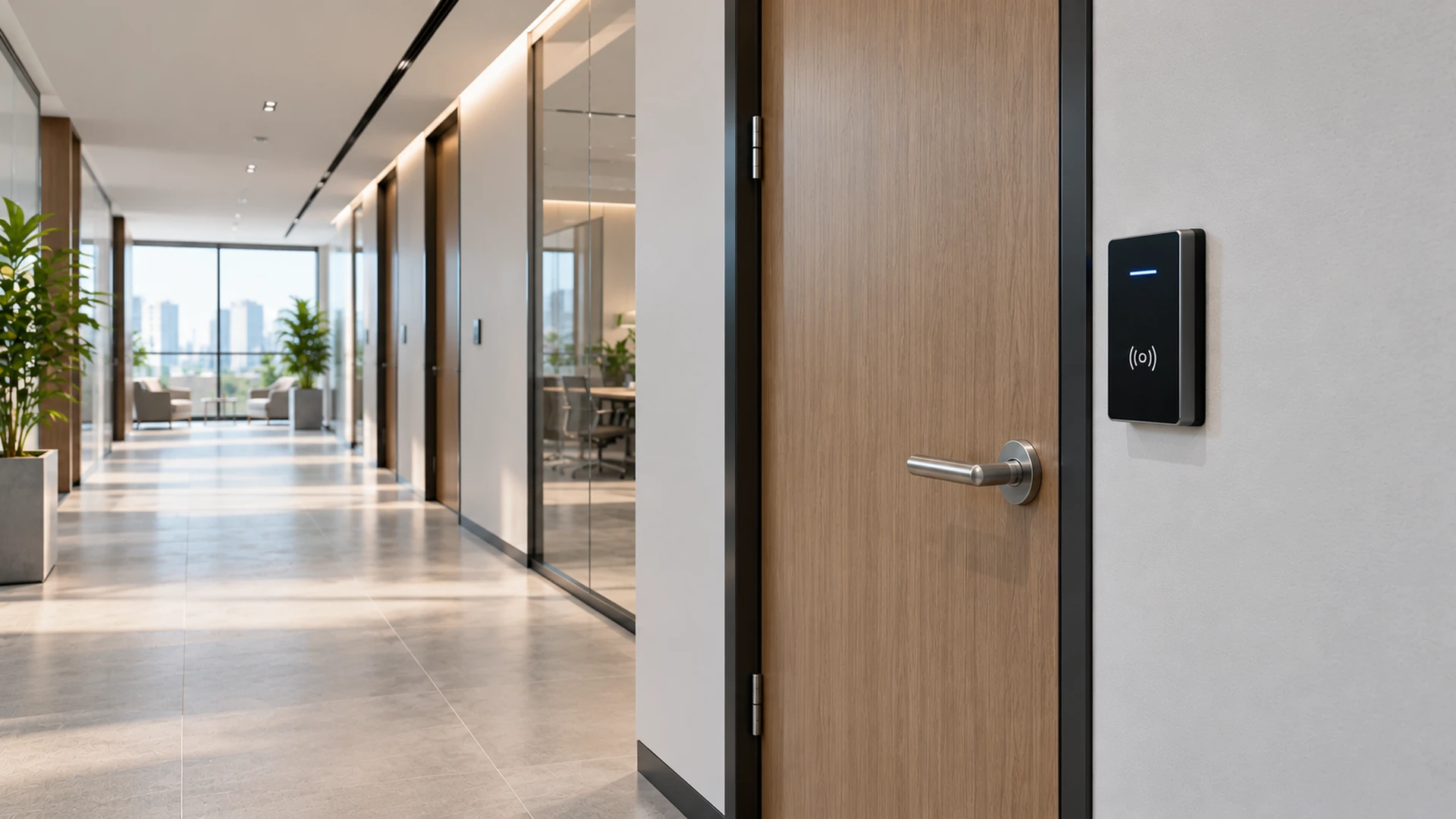
Consider an illustrative office with a public reception area and a controlled staff corridor. A valid employee credential may be permitted at the corridor entrance during an assigned schedule. The same credential can be denied at a different opening or outside that schedule. The example separates the identity record from the permission associated with a particular place and time, a distinction also reflected in RCMP access-management guidance.[3]
Define the system boundary before comparing equipment. An entrance might include visitor communication, a mechanical door assembly, electronic access decisions and a staffed assessment process. Give each function an owner. This avoids treating a credential database as the entire entrance design or assuming that every related function comes from the same application.
Components of a controlled entrance
An opening schedule should describe both the decision path and the physical assembly. GSA separates reader, controller, management and repository functions, while RCMP guidance addresses electronic permissions and door conditions.[2][3] Use those distinctions to build an inventory with a purpose for each item.
The following questions translate component names into requirements.
| Element | Question to answer in the opening schedule |
|---|---|
| Credential and identity record | What is presented, and which maintained record does it represent? |
| Reader | What supported information does it collect and pass onward? |
| Controller or decision service | Where are permission and schedule evaluated? |
| Locking hardware | Which hardware action permits entry? |
| Position and lock feedback | Which physical conditions are actually monitored? |
| Exit arrangement | How does the occupant leave under normal and applicable failure conditions? |
| Management service | Who changes permissions and retrieves records? |
| Power and communications | Which supplies and links support each function? |
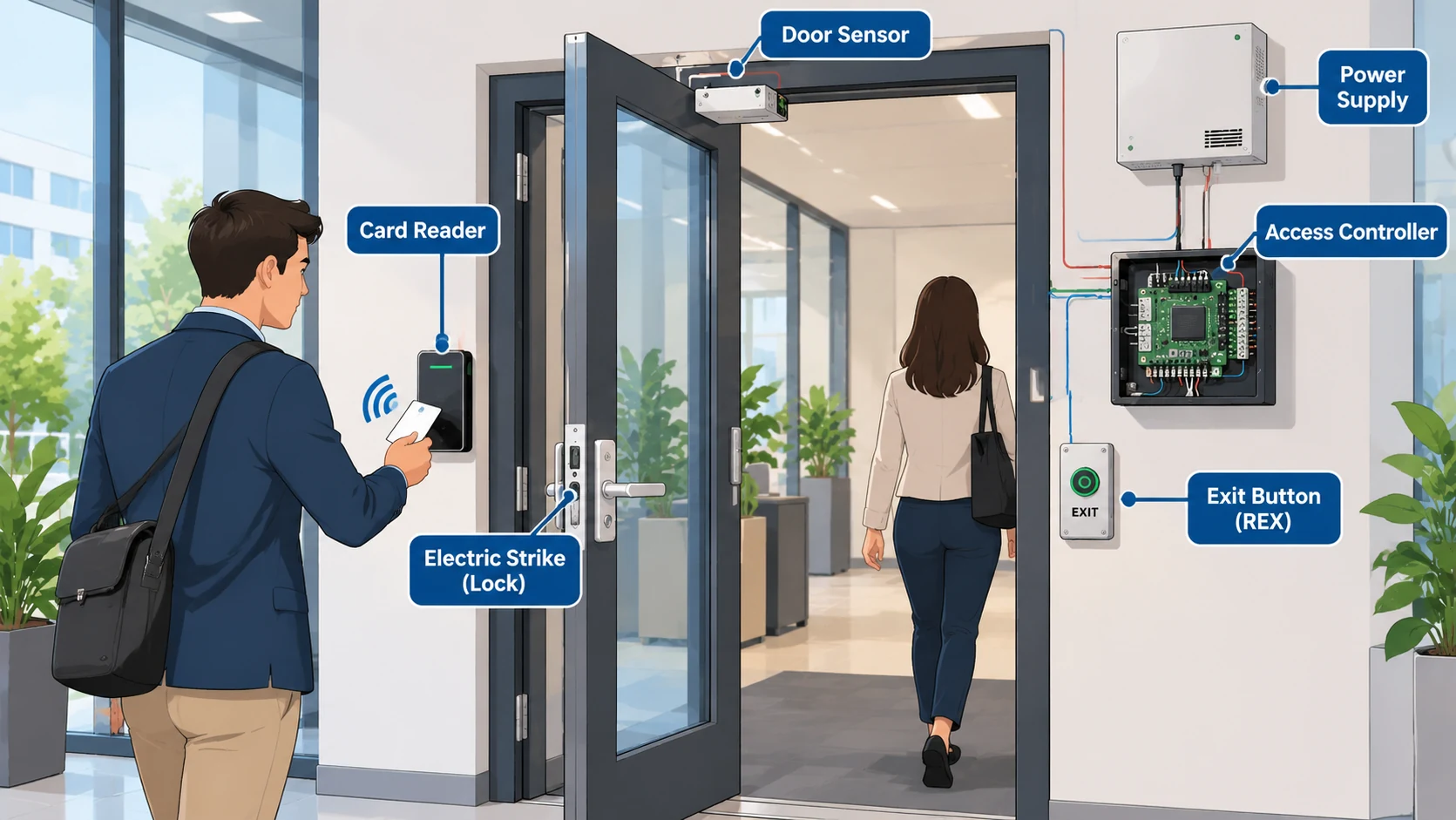
Keep the lock, door position and access decision as separate entries. A successful command is an instruction; a monitored condition is feedback. The distinction is visible in the AXIS A1001 documentation, which provides separate door-monitor and lock-monitor functions.[4]
For example, specify what evidence the operator needs after a remote entry release. Is the task to know that the command was accepted, that the door opened, or that the opening returned to its expected state? Record the answer for that opening rather than leaving the installer to infer it from a generic screen label.
How authentication and authorization produce a door decision
Describe the transaction in functional stages. A person presents a credential; the system obtains identifying information; the configured decision path checks permission; the permitted action is issued; and available feedback reports what happened. GSA’s reference architecture and NIST’s utility demonstration show why decision processing should be described for the selected architecture rather than assigned universally to one box.[2][5]
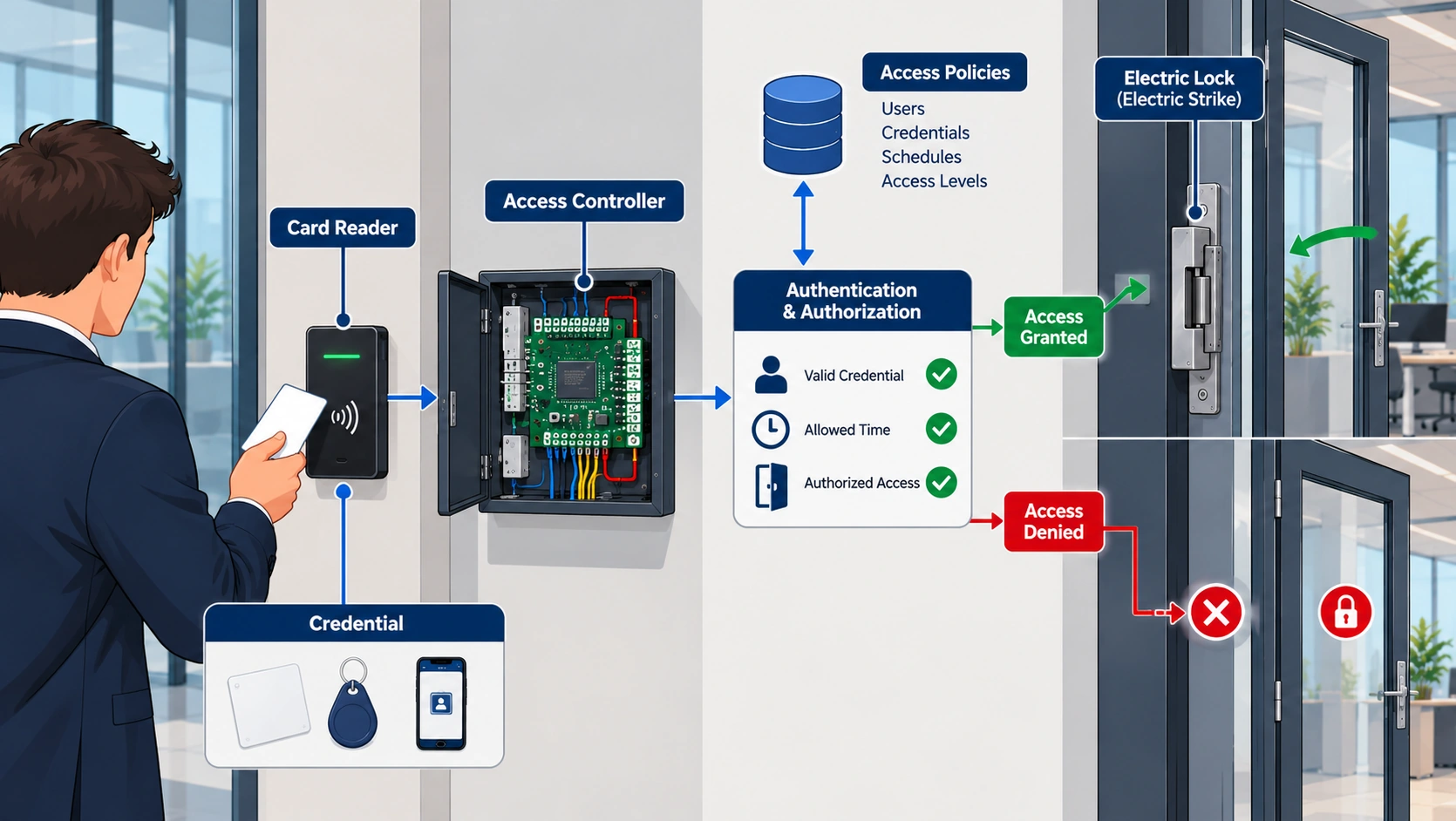
In the NIST demonstration, authorization information is distributed so runtime decisions can occur locally. Central administration and local decision making therefore need separate descriptions. This is an architectural example, not a promise that every networked controller behaves that way during an outage.[5]
A useful acceptance narrative follows an ordinary transaction all the way through. Identify the presented credential, expected authorization result, requested hardware action, observed opening condition and resulting record. Then repeat with a credential that lacks permission. SIA’s implementation and troubleshooting guidance supports staged functional testing; a reader indication alone does not demonstrate a successful access transaction.[6][7]
Avoid acceptance language such as “reader works.” An illustrative test description might instead say: “Present the approved test credential at the named entrance, confirm the expected access result and opening feedback, and verify that the operator can retrieve the corresponding event.” The project team supplies the safe test method and expected conditions. This wording checks the relationship between functions without prescribing lock wiring or emergency behavior.
Door states, monitoring and exit functions
Door events need precise meanings. In the AXIS A1001 example, a held-open condition depends on a configured time, and request-to-exit behavior can be configured without directly unlocking hardware where mechanical exit operation is used. Its supervised-input function also depends on the documented monitoring arrangement.[4]
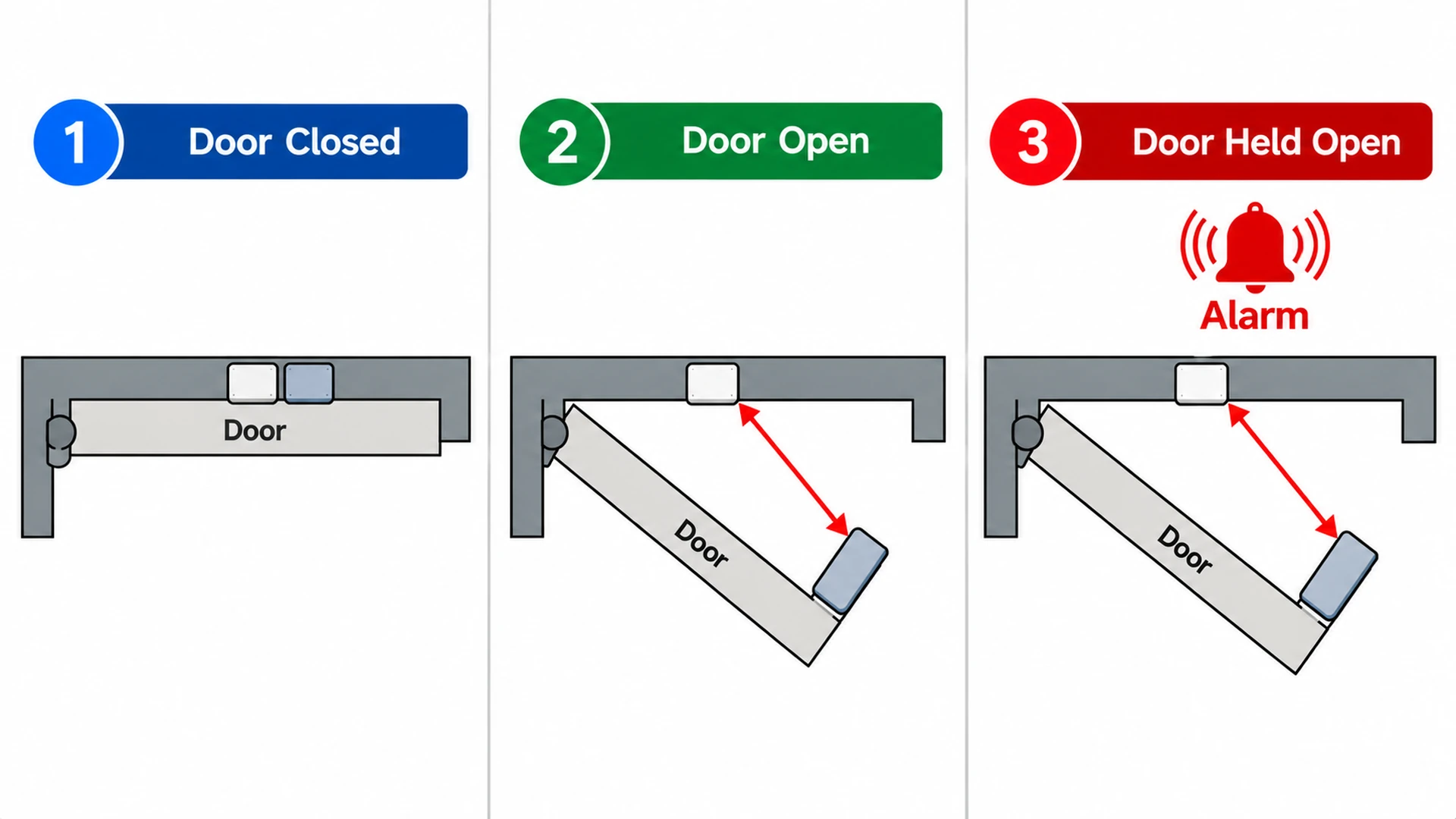
These are implementation examples with an important planning consequence: define each event in the selected system. Ask which input produces it, which operating state gives it meaning, whether timing is involved, and what action the operator is expected to take. Do not copy an event label into a specification without its behavior.
Use a small event schedule to settle the terminology.
| Required distinction | Project question |
|---|---|
| Access granted versus door opened | Which record proves the decision, and which input reports movement? |
| Door closed versus lock condition | Is separate lock feedback provided and needed? |
| Held-open indication | What configured condition starts and clears it? |
| Exit request versus physical exit | Does the input request release, explain movement, or perform another documented function? |
| Intrusion-related event versus input trouble | How are the operator messages distinguished? |
The schedule is a requirements tool, not a universal event taxonomy. Review it with the hardware designer, system integrator and operating team. Where an event depends on a feature that is absent, state that absence rather than presenting inferred feedback as a measured condition.
Credentials and access policies
Authentication factors answer how an identity claim is checked. Authorization answers which resource that identity may use. A credential technology and an access group therefore occupy different parts of the design. GSA’s glossary and RCMP’s discussion of scheduled electronic permissions support this separation.[2][3]
Begin policy design with a business task. Describe the people who need an opening, the relevant operating periods and the person authorized to approve access. Then describe how the chosen credential and system enforce that decision. This keeps policy understandable when the credential medium changes or a department reorganizes.
Treat enrollment and removal as one lifecycle. NIST’s utility example explicitly connects work assignments with provisioning and subsequent deprovisioning.[5] For an illustrative contractor visit, document who approves the visit, who creates or assigns the credential, what ends the authorization and who verifies that removal completed. The proposed workflow needs an accountable owner at each transition.
Separate cardholder administration from broad system administration in the requirements. Ask who can change an individual’s permission, who can change a door’s operating schedule, and who can alter the architecture or export records. These questions help the owner define privileges before the implementation team configures them. They do not establish a particular role model or imply that every product exposes identical controls.
Networked and stand-alone architectures
Describe architecture along separate axes: management scope, decision location and hosting location. GSA distinguishes local and enterprise deployment models. Its federal evaluation-program guidance also recognizes on-site, private-cloud and public-cloud deployment choices, subject to the applicable assessment.[2][8]
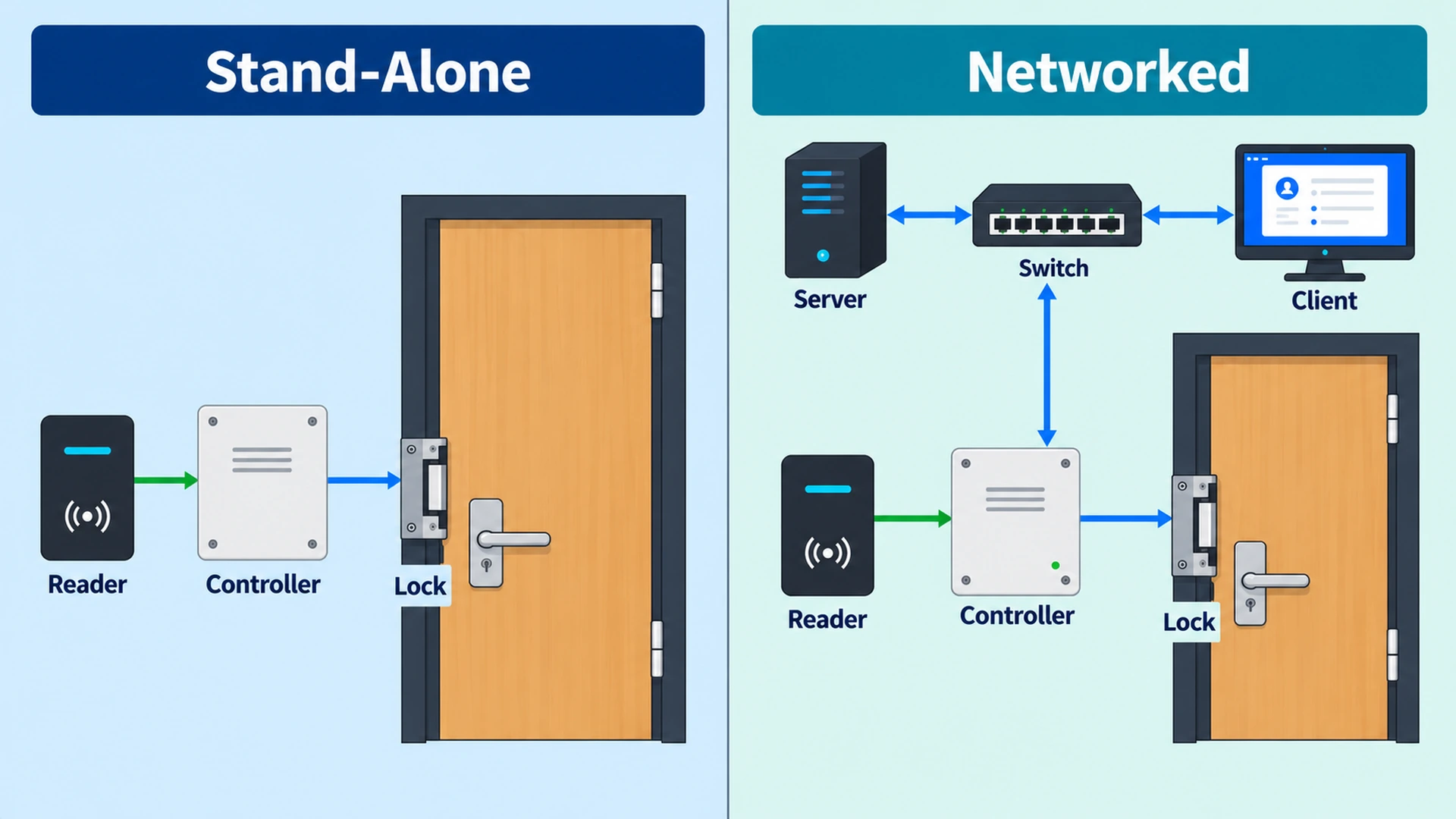
A centralized management service can coexist with locally stored permissions. Conversely, knowing that a controller is physically in the building does not establish what remote services it needs. For each proposed design, draw the actual dependencies for ordinary access, permission updates, event collection and administrative login. NIST’s distributed example illustrates why those paths may differ.[5]
An illustrative requirements comparison should ask the same questions of every proposal: Where does a normal decision occur? How does a changed permission reach that location? What confirms delivery? Which functions require the wide-area link? What information is available while a service is unavailable? How does recovery reconcile the intended state?
Use the answers to compare complete operating arrangements. A single-site building may still need remote administration, while a multisite organization may need different local operating policies. Treat “cloud,” “enterprise” and “stand-alone” as descriptions to unpack into functions and dependencies. They are insufficient acceptance criteria on their own.
Power, communication and failure behavior
Loss of management connectivity, loss of controller power and loss of lock power are different scenarios. Backup power addresses a continuity need; it does not, by itself, settle emergency-release design. RCMP guidance discusses backup arrangements separately from magnetic-lock release considerations.[3]
Fail-safe and fail-secure describe specified locking behavior when power is lost. They do not fully describe inside egress. In Allegion’s documented L9492EL/EU example, the EU (fail-secure) version keeps the outside lever locked without power, while the inside lever remains free. This is a bounded product example demonstrating why entry security and occupant exit need separate analysis.[9]
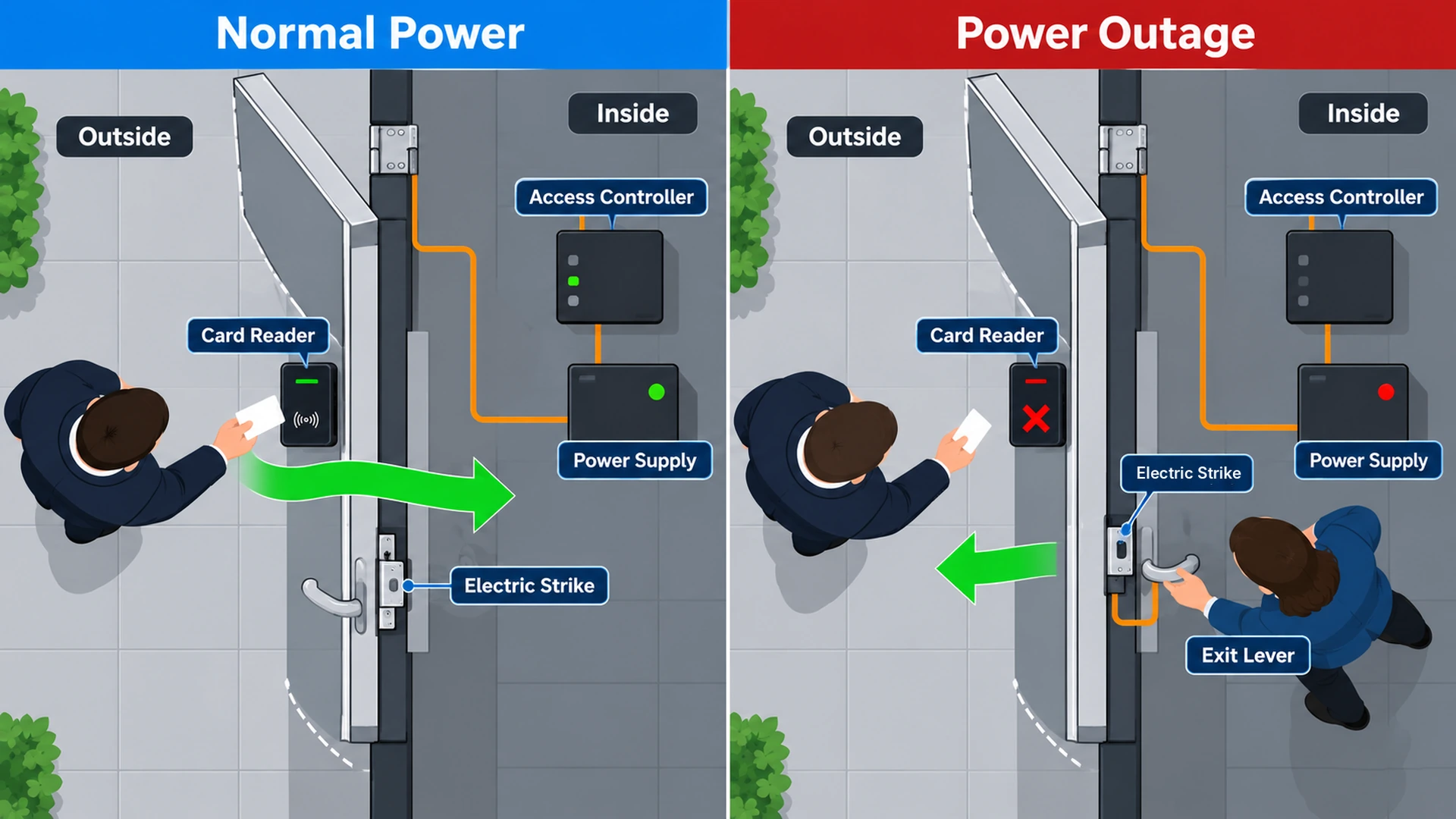
Build a failure matrix around functions rather than a single “system offline” statement.
| Scenario to assess | Required answer from the selected design |
|---|---|
| Management connection unavailable | Local decision capability and information visibility |
| Permission update interrupted | Delivery evidence and the authorized recovery process |
| Reader/controller communication lost | Resulting entry behavior and operator indication |
| Controller supply unavailable | Affected inputs, decisions, outputs and reporting |
| Lock supply unavailable | Specified hardware behavior at that opening |
| Service restored | State reconciliation and evidence of return to service |
These rows are planning scenarios, not predicted outcomes for every system. Obtain the actual behavior from the supported hardware and software design, then test it under an approved commissioning method. Name the owner who accepts temporary limitations and the person who declares the affected function restored.
Integration with alarms, video and identity systems
An interface needs a defined operational purpose. RCMP guidance recognizes integration between electronic access control and CCTV.[3] For the imaging and recording side, see video surveillance systems. Keep the access decision, associated image and operator assessment distinguishable in the interface requirements.
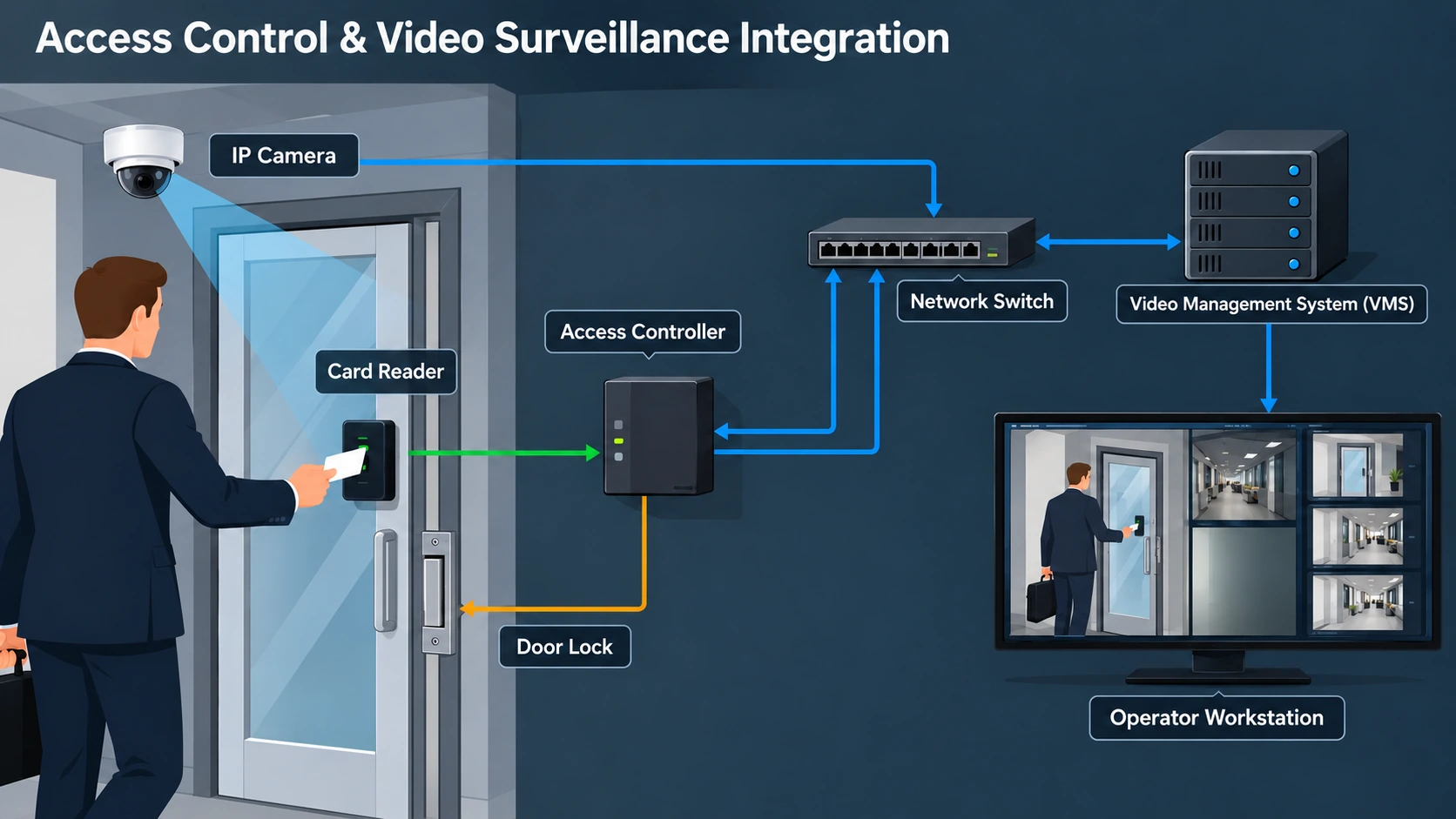
For example, an owner may want a door event to present a relevant camera view. Specify the event identifier, opening-to-camera association and information the operator needs to assess it. Ask what appears if the camera or integration is unavailable. The example is a proposed use case; successful behavior depends on the selected integration and its tested configuration.
For identity integration, document who owns the authoritative person record and who approves building permissions. NIST’s provisioning and deprovisioning scenario provides a useful reference for the lifecycle connection.[5] Require the project to explain how a personnel change becomes an access change and what confirms completion. Avoid treating transmission of a message as proof that every affected decision point has applied it.
Keep emergency interfaces within the governing door and fire-safety design. An ordinary management integration description does not establish authority to alter emergency operation. Identify the responsible designer and the applicable approval process before specifying those interactions.
Cybersecurity and administration
Protect communication paths and management functions according to their role. SIA explains that OSDP Secure Channel protects reader-to-controller communication; selecting OSDP alone does not establish that the protected mode is enabled and correctly configured. Feature support, firmware and staged interoperability checks remain part of implementation.[6]
NIST SP 800-82 Rev. 3 supports segmentation based on required communications and usable logging for operational technology. Apply those principles to a documented communication matrix: source, destination, purpose, administrative owner and required access. Include the effect of restrictions on operation when reviewing the design.[10]
Ask the integrator to demonstrate the intended administrative paths and the records available for investigation. A useful project question is: “Can the authorized team connect a permission change, its responsible account and the resulting door events?” Determine which records actually exist, how they are retrieved and who controls them. Logging requirements should name the questions the owner needs to answer rather than merely request “full logs.”
Egress and jurisdiction-dependent requirements
The opening’s entry-control behavior and its exit obligations must be coordinated under the applicable rules. In the United States workplace context, OSHA 29 CFR 1910.36(d)(1) requires an exit-route door to be openable from inside without a key, tool or special knowledge. Paragraph (d)(2) addresses devices whose failure could restrict emergency use. The inside-locking exception in (d)(3) has narrow institutional conditions.[11]
Those provisions establish a scoped example, not a global specification for every building or locking arrangement. The project needs its occupancy, jurisdiction, adopted requirements and responsible authority identified. Exact fire-alarm release arrangements, permitted special locking systems and acceptance procedures belong to that governing design.
IEC 60839-11-1:2013 addresses system and component requirements for electronic access control. Its catalog describes the scope, including functionality, performance, testing, logging and information control. A catalog entry does not establish that a particular installation meets a clause or a locally adopted requirement.[12]
At the requirements stage, record who resolves the interface between physical security, electrical supply, door hardware and life safety. Carry the resulting decisions into the opening schedule and commissioning documentation. This gives the operating team a traceable description of the intended behavior without asking it to derive code decisions from software settings.
Planning requirements for a building entry
Bring the design together as an opening-by-opening requirements package. GSA and RCMP guidance provide the architectural and access-management basis; NIST adds the need to consider the operating environment and applicable constraints.[2][3][10] The following is a proposed structure for translating those principles into project decisions.
Start with the entrance purpose and authorized user groups. Add the expected transaction, credential assumptions, schedules and approving owner. Describe the physical opening, required feedback and inside-exit arrangement. Identify each power source and communication path. Then record administration, integration, outage and recovery requirements using the same opening identifier throughout.
Attach acceptance evidence to each important statement. “Remote management required” needs a defined administrative task. “Door monitoring required” needs named measured conditions. “Offline operation required” needs a specified unavailable service, expected remaining functions and recovery evidence. SIA’s testing guidance and the documented monitor behavior show why end-to-end evidence is more useful than isolated component indications.[4][6][7]
Finish by assigning unresolved decisions to named project roles before detailed configuration begins. Access groups, device selection and installation details can then develop from a shared account of what the opening must accomplish. The resulting package connects a person’s authorization to an observable door transaction and an accountable operating process.
For an illustrative handover exercise, ask a facilities representative and a security administrator to explain the same entrance using the completed schedule. One describes physical operation; the other describes permissions and records. Record any conflicting expectations as a design question with an assigned owner. This proposed exercise follows the complete-transaction approach: the goal is a common, testable account of the entrance, including the point where each team’s responsibility begins and ends.[2][6]
References
- NIST. Physical access control system — glossary. Live page; publication date not stated; Definition and source attribution. csrc.nist.gov (accessed 22 October 2026).
- GSA / IDManagement.gov. Physical Access Control Systems 101. Live guidance; date not stated; PACS Explained; Deployment Models; Glossary; Planning. www.idmanagement.gov (accessed 22 October 2026).
- RCMP. GCPSG-006 (2024) Access Management Guide. 2024 designation; Sections 6.4.2, 7.1, 7.4–7.5. rcmp.ca (accessed 22 October 2026).
- Axis Communications. AXIS A1001 and AXIS Entry Manager technical documentation. Live manual; revision date not established; Door monitor/time options; REX options; supervised inputs; scheduled unlock states. help.axis.com (accessed 22 October 2026).
- NIST NCCoE. Identity and Access Management, NIST SP 1800-2 Vol. B. 2018 guide; version shown in source; Section 5.2 scenario and architecture discussion. www.nccoe.nist.gov (accessed 22 October 2026).
- SIA, protocol issuer. Implementing OSDP Access Control? Follow This Simple Checklist. 10 February 2026; Items 1–5 and 11. www.securityindustry.org (accessed 22 October 2026).
- SIA. Your Step-by-Step Guide to OSDP System Troubleshooting. 28 April 2026; Items 4–10. www.securityindustry.org (accessed 22 October 2026).
- GSA / IDManagement.gov. FIPS 201 Evaluation Program — deployment guidance. 9 April 2025 announcement; Guidance on solution deployment. www.idmanagement.gov (accessed 22 October 2026).
- Allegion. L9492EL/EU technical entry. Undated live documentation; Resolution. kc.allegion.com (accessed 22 October 2026).
- NIST. Guide to Operational Technology Security, NIST SP 800-82 Rev. 3. September 2023; Sections 5.2.3.1–5.2.3.2, 6.2.1.2; printed pp. 71–73, 99. nvlpubs.nist.gov (accessed 22 October 2026).
- OSHA. 29 CFR 1910.36 — exit routes. Current online regulation, accessed 2026; Section 1910.36(d)(1)–(3). www.osha.gov (accessed 22 October 2026).
- IEC. IEC 60839-11-1:2013, Alarm and electronic security systems — Part 11-1. 7 May 2013; Edition 1.0; Abstract; Product detail. webstore.iec.ch (accessed 22 October 2026).