

A video surveillance system, often called closed-circuit television (CCTV), is a connected set of equipment and software that captures, transmits, displays and stores video for security monitoring and investigation. Cameras create the images; transmission links deliver them to recording and viewing functions, while management software helps authorized users find and use the footage. A useful design connects those functions to a defined operational task, from assessing an entrance alarm to retrieving a recorded incident.[1][2]
What video surveillance systems do
Start with the question the operator needs to answer. Is someone approaching a restricted entrance? What happened during an incident? Which recorded view contains the activity under investigation? These are different tasks, even when they involve the same camera.
Video supports observation, alarm assessment and coordinated response. It does not physically stop someone entering a space. The operational plan should therefore identify who receives an alert, who examines the images and who acts on the result.[1]
Treat live monitoring and investigation as separate acceptance tasks. For live monitoring, specify the view an operator needs when an event occurs. For investigation, specify how a trained user will locate, preserve and export the relevant recording. A successful live demonstration should not substitute for a retrieval demonstration.[2]
The International Electrotechnical Commission’s IEC 62676-4:2025, Video surveillance systems for use in security applications — Part 4: Application guidelines, covers planning, design, installation, testing, commissioning and maintenance. Its published scope describes capture devices, interconnections and image-handling devices: a useful reminder that the system extends beyond the camera.[3]
The system’s functional architecture
Describe the architecture by function before assigning each function to a box, server or service. Recording and management can be packaged together, but their jobs remain distinguishable.[2]
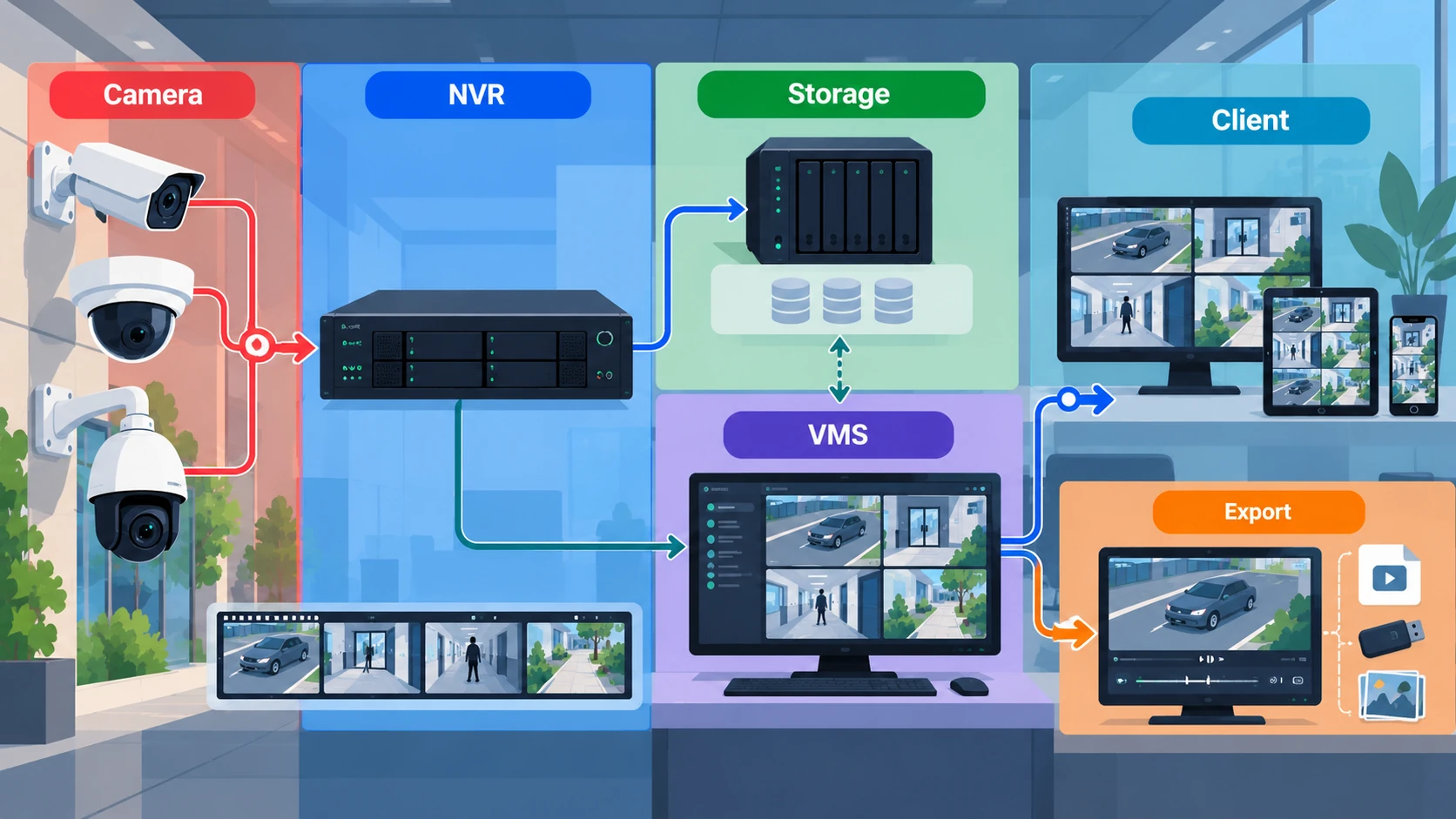
This functional map identifies what each part contributes to the video path.[1][2]
| Function | Its role | Question for the system specification |
|---|---|---|
| Capture | Form an image of the scene | What activity or detail should the view show? |
| Transmission | Carry video to its destination | Where does each required stream need to go? |
| Recording | Retain video for later use | Which views and events should be recorded? |
| Storage | Hold the retained media | Where should footage reside, and under whose control? |
| Management and viewing | Present live video and support investigation | Who can view, search, replay and export? |
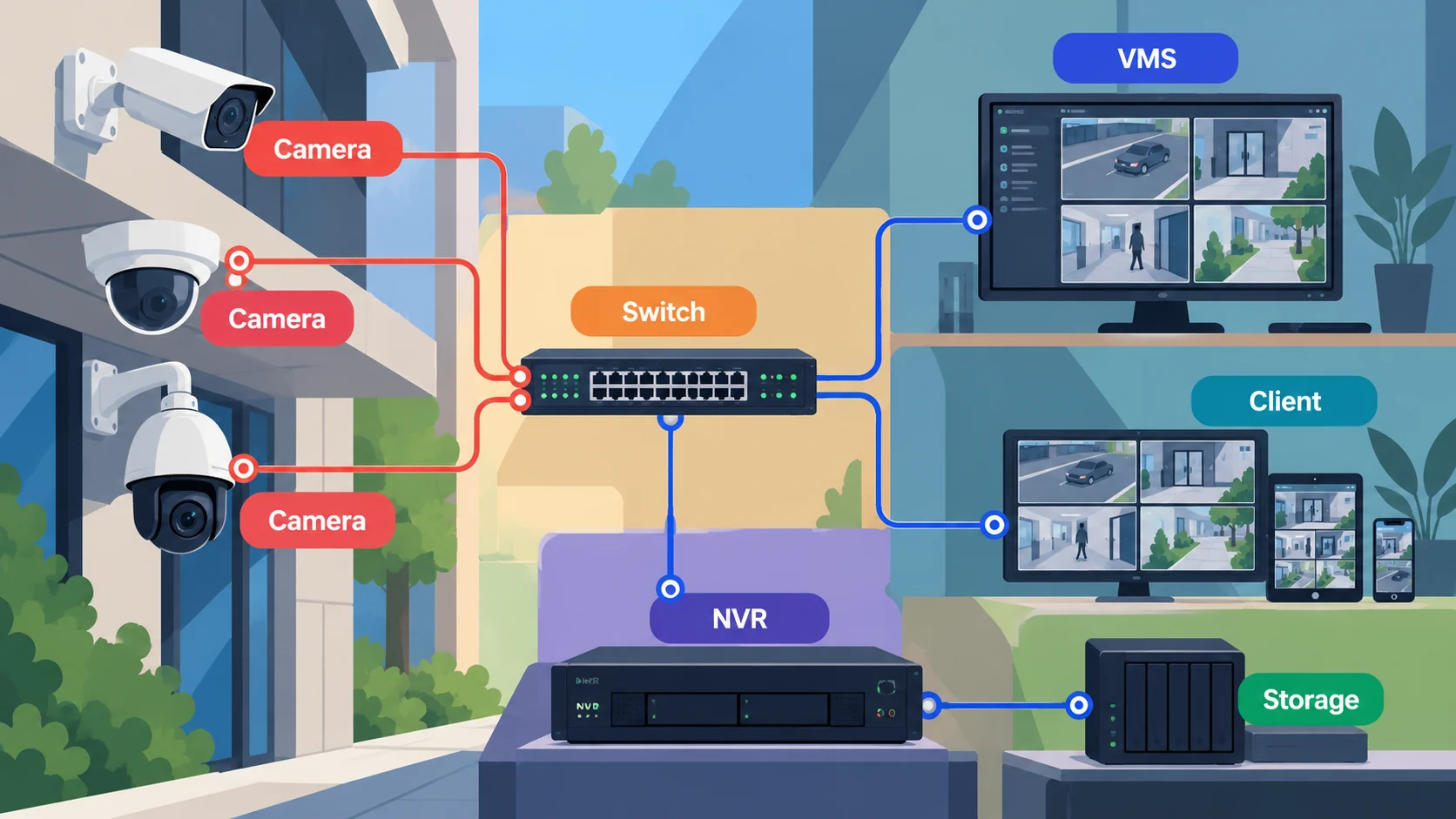
For an illustrative entrance-monitoring requirement, trace the live path from the entrance camera to the operator. Then trace the recorded path from that camera to storage and back to a replay client. Finally, ask the operator to export the relevant interval. Document each path separately so acceptance does not end at the first visible image.[4]
In an illustrative local Internet Protocol (IP) arrangement, cameras connect through a network switch to recording and management components. A recording server stores the received media, while an operator uses a client to view the system and retrieve recordings. Mark the live-video path separately from the recording and replay paths on the project drawing. This arrangement illustrates roles, not a mandatory topology.[5][6]
Analog, IP and hybrid signal paths
Analog and IP describe different ways of carrying video through the system. Annex A of International Telecommunication Union Telecommunication Standardization Sector Recommendation ITU-T K.142 (11/2019) distinguishes analog, hybrid digital-analog and IP-based arrangements. In its hybrid example, an analog camera sends video over coaxial cable to a digital video recorder (DVR); the recorder provides digital recording and playback.[5]
An IP camera captures, processes and encodes video for network delivery. A network video source can also be an encoder device, as the Open Network Video Interface Forum (ONVIF) Profile T specification explains. Identify the actual source and receiver when documenting the path.[7][8]
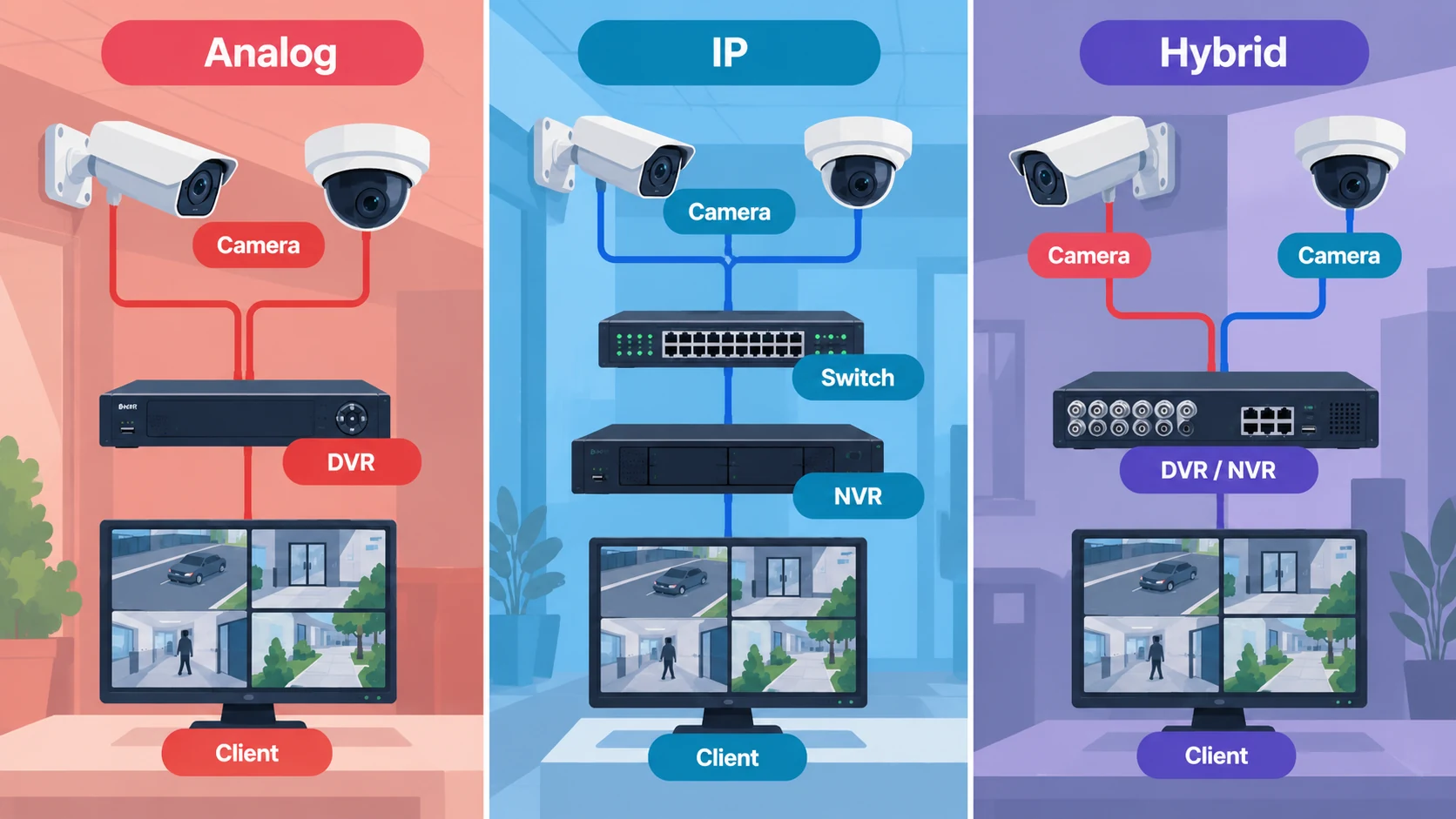
Do not use “hybrid” without describing the combination. Analog cameras with digital recording concern the signal architecture. A system that splits functions between a building and a cloud service concerns deployment location. A project can involve both questions.
Cameras and video capture
The lens focuses light from the scene onto the imaging sensor, and the camera converts the resulting image into a signal for transmission. Lens selection, scene conditions and camera position therefore belong to the capture problem, even when recording and management occur elsewhere.[1]
An IP camera also processes and encodes its video before sending it to a receiver. Encoding is part of making the captured video available over the network; it should not be confused with deciding where that video will be stored.[7]
Describe a camera requirement in terms of the intended view. For example, distinguish observing activity across a reception area from examining a particular entrance transaction. Label these as separate tasks in the design record rather than assuming an overview answers both.
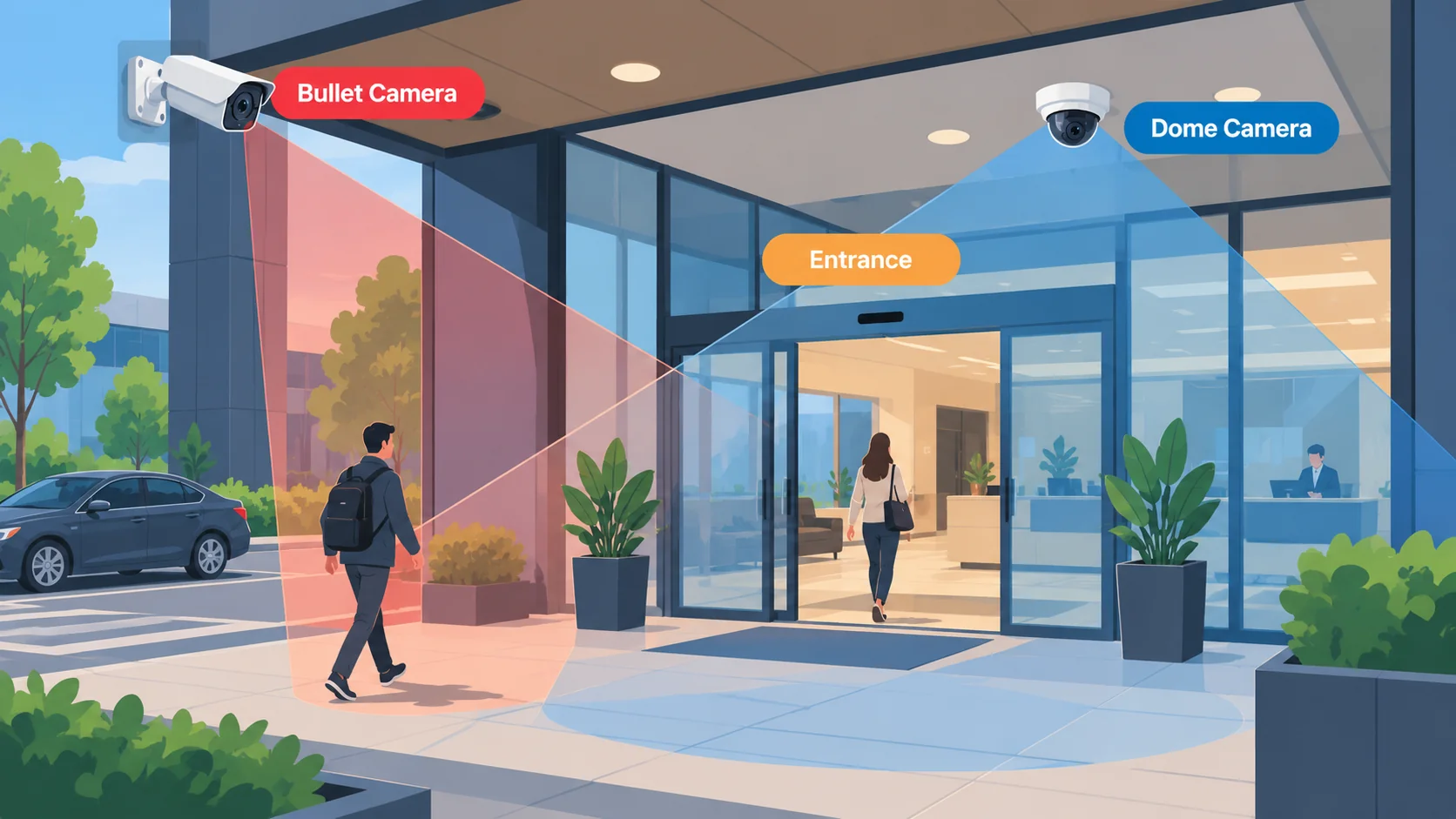
Lighting changes and environmental obstructions affect the image available to the system. Assess the intended view under relevant daylight and low-light conditions, including bright backgrounds and obstructions. A view should be judged against its task under those conditions.[1]
Analytics adds another function to this chain. A camera or analytics service can produce metadata describing video content; that metadata is separate from the video itself. Specify whether the application needs the images, the associated metadata or both, and identify the receiving application.[9]
Transmission, power and network architecture
The transmission design connects each source to the recording, viewing and management functions that need it. Record the destinations and operating scenarios first. This makes the network requirement traceable to actual video use rather than merely to the number of installed cameras.
Cabling carries signals between those functions. Coaxial cable carries electrical video signals in analog arrangements; fiber-optic links carry light and need the appropriate interfaces at their ends. Cable choice and endpoint interfaces should be coordinated with the intended signal path.[1]
Power over Ethernet (PoE) allows a compatible network arrangement to carry electrical power and data on the same cable. Power supply compatibility and backup provision remain design considerations for the system as a whole.[1]
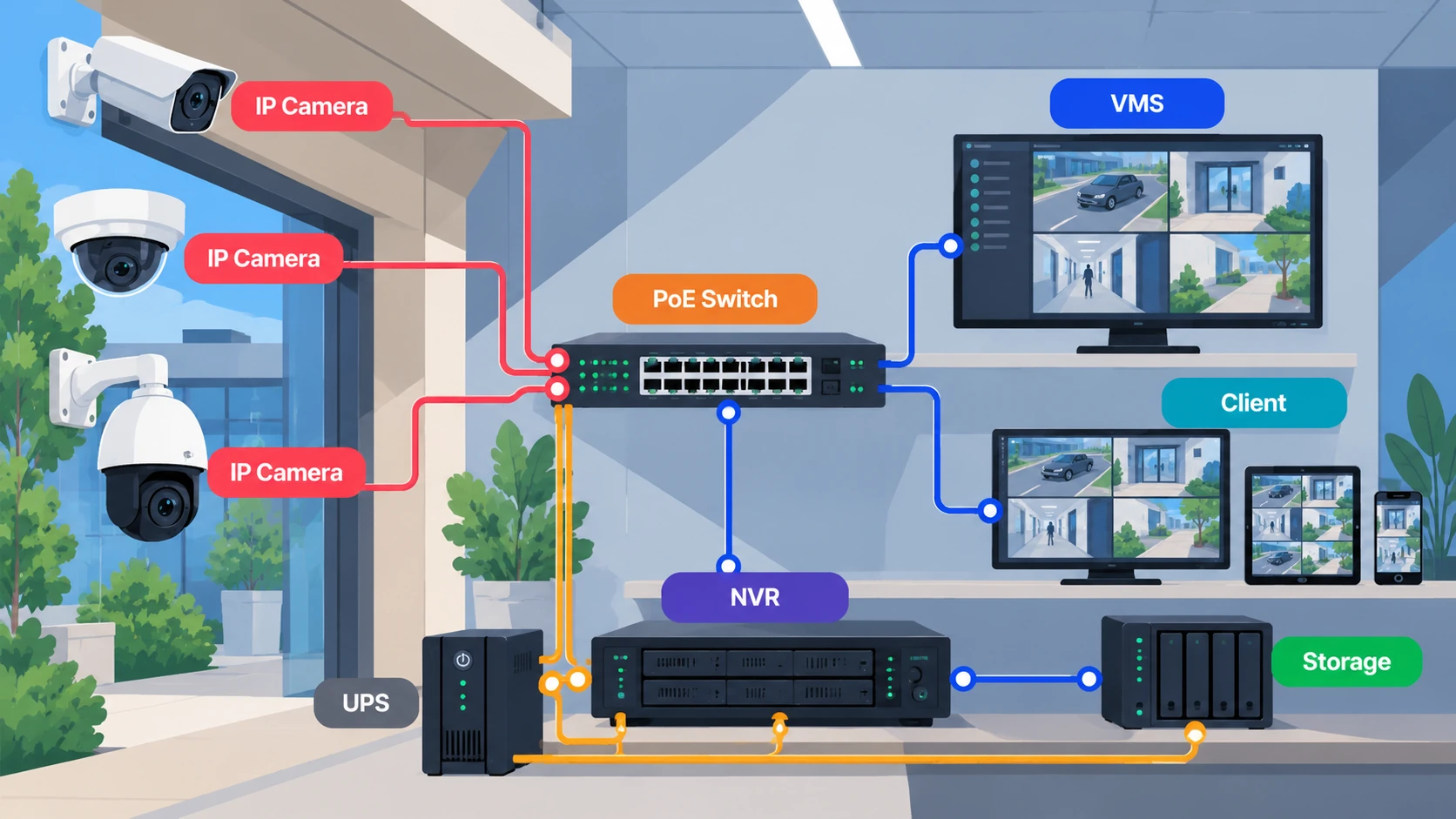
Document which components are intended to remain operational during a power interruption. Include capture, transmission, recording and viewing in that discussion. The acceptance question is whether the required surveillance task continues, and which functions the design intentionally permits to stop.
Network demand depends on camera count, resolution, frame rate and other traffic sharing the network. Sending video across a network for recording also creates a different traffic pattern from transferring footage that was first recorded locally.[10]
Specify the scenarios to assess: normal recording, operator viewing, incident retrieval and any required remote access. Ask the network design to demonstrate those scenarios together where simultaneous use is required. Leave numerical capacity calculations to the detailed design rather than assigning a generic allowance to every camera.
Compression reduces the data needed for transmission and storage. Lossy compression discards information, so reduced traffic and storage demand should be evaluated alongside the recorded image’s usefulness.[10]
Delay and delivery reliability also need an explicit requirement. The Internet Engineering Task Force’s (IETF) informational RFC 8761 explains that retransmission and low-delay delivery involve different constraints on networks subject to packet loss. For a live assessment task, specify the acceptable response behavior and test the implemented path.[7]
Recording, storage and video management
A network video recorder (NVR) receives network video for recording. A video management system (VMS) provides software functions for using the system, including live viewing, search, playback and user access management where supported. The terms describe overlapping system roles rather than mutually exclusive product classes.[2][6]
An appliance might combine recording, storage and management. A server-based design might assign those functions across several components. Ask what the proposed arrangement actually does instead of assuming that its product label defines its architecture.[2][6]
For a recording server, document which sources it records and where their media resides. For storage, document the retention policy it supports. For management software, document who can access each function and how investigators retrieve footage.
The following questions separate responsibilities that are easily blurred in a system proposal.[2][6]
| Responsibility | Question to resolve |
|---|---|
| Recording control | Which source is recorded, and how is recording requested or configured? |
| Storage location | Is the recording on a device, on premises or with a remote service? |
| User management | Who can view live images, replay recordings, export or delete? |
| Investigation | How does a user find the relevant camera and interval? |
| Playback | Can the intended recipient use the delivered recording? |
ONVIF Profile G Specification v1.1, Section 4, describes devices that record on the device itself or over an IP network, and clients that configure, request and control recording. This distinguishes the recording interface from the physical location of storage.[6]
Write the recording and access requirements together. A retention policy has little operational value if the authorized user cannot locate the relevant footage, while broad access is inappropriate when only a limited role needs it. Define the retrieval task and the permissions needed to perform it.[2]
On-premises, edge, cloud and hybrid approaches
Deployment location determines where responsibilities and dependencies sit. Avoid selecting an architecture solely from the labels “local” or “cloud.”
Use this comparison as a set of design questions, then confirm the answers for the proposed implementation.[2][6]
| Arrangement | Function placement | Questions to resolve |
|---|---|---|
| On premises | Recording and storage are maintained at the site or within the organization’s infrastructure | Who maintains the recording environment and manages access? |
| Edge | Recording occurs on the camera or another source-side device | How will footage be retrieved and protected at that location? |
| Cloud | A remote service provides specified management or storage functions | Which tasks depend on connectivity, and who administers the service? |
| Mixed deployment | Functions are divided between these locations | Where does each function run, and how are the parts used together? |
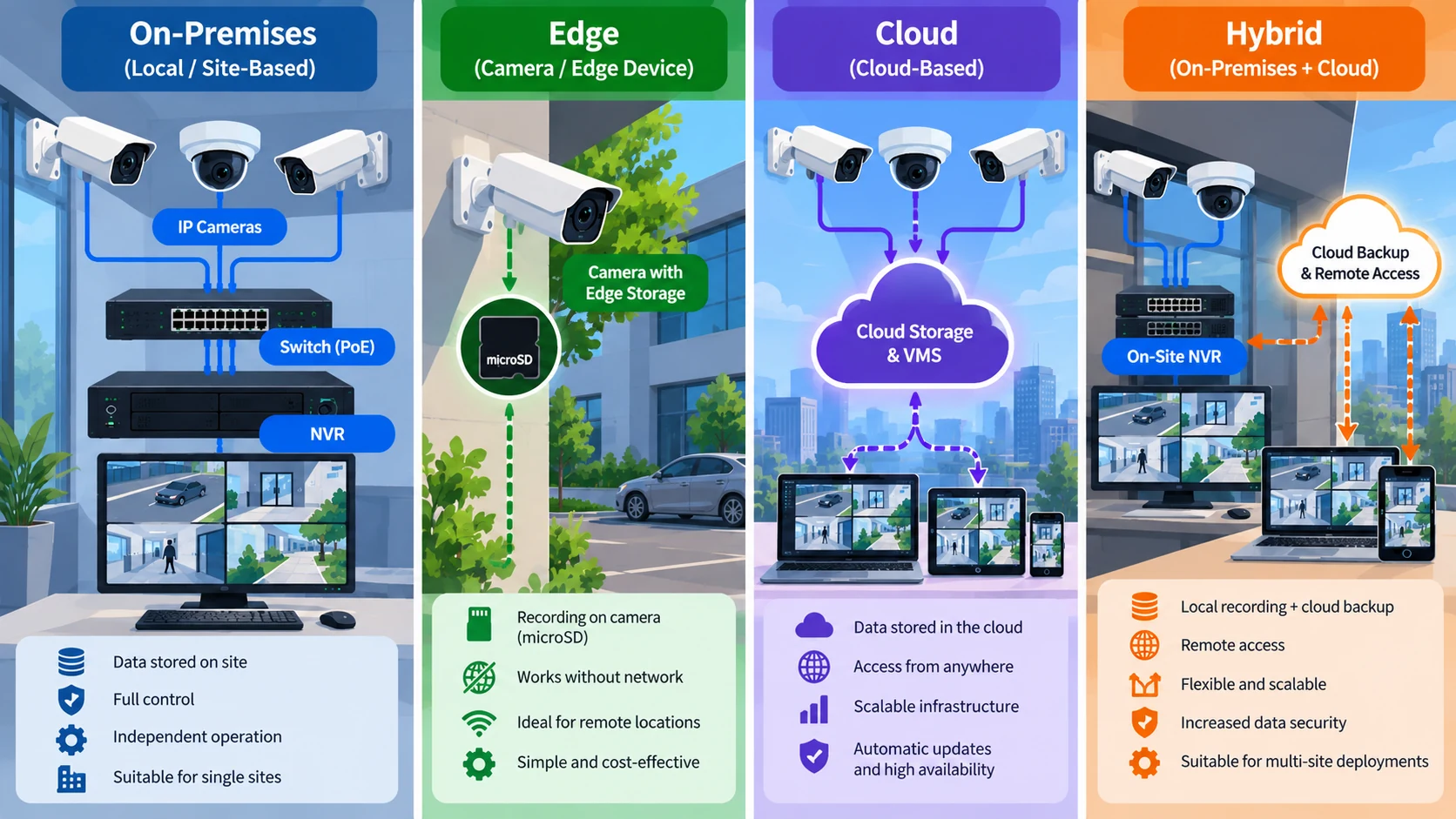
For a mixed deployment, request a written allocation of responsibilities. Identify the recording location, the management client, the export path and the staff or provider responsible for each. This is more useful than a diagram that labels the entire proposal “hybrid” without explaining the split.
Ask the supplier to demonstrate the required behavior during a lost connection and after reconnection. Do not assume that local recording, remote access and recovery behave alike across implementations. Specify which tasks must continue and make those tasks part of acceptance.
The same approach applies when changing an existing system. First document its current recording and retrieval paths. Then identify which responsibilities the proposed change relocates. A change of storage location should be accompanied by a clear account of how operators will obtain and handle the footage they need.
Edge storage also places the retained footage at the device location, so assess the consequence of device damage, tampering or loss. Cloud storage changes custody and depends on connectivity for remote service access. Compare these dependencies against the actual recording and retrieval requirements rather than assuming either location is inherently preferable.[2]
Image usability, retrieval and retention
Assess the recording the system actually produces. UK police guidance recommends testing under intended operating conditions and reviewing recorded video rather than relying on the live display. It also emphasizes accurate time information, protection of relevant recordings and usable export and playback.[4]
Turn those principles into an acceptance exercise. For an illustrative entrance incident, have an authorized operator find the relevant interval, replay it, preserve it and deliver an export to the intended reviewer. Assess whether the recording answers the original task.
Keep the exercise tied to the operational requirement. The reviewer should know what they are trying to establish before assessing image quality. Otherwise, a technically successful playback test can finish without showing whether the footage contains the needed information.
Separate routine retention from preservation of a specific incident. The first determines the normal recording lifecycle; the second protects identified footage needed for a particular investigation. Both need an accountable operator and a documented procedure.[4]
For footage intended for investigation, specify export of the native recording without additional quality-reducing conversion. Include any software needed to replay it, and confirm that the exported time and date remain usable. Test this delivery with the intended recipient.[4]
Retention periods also need a jurisdiction-specific basis. In its displayed UK guidance, the Information Commissioner’s Office (ICO) says the UK General Data Protection Regulation (UK GDPR) and Data Protection Act 2018 do not prescribe a general minimum or maximum surveillance retention period. The purpose determines the necessary period; available storage alone does not justify it. That guidance carries an under-review notice following legislative changes.[11]
Do not let the storage specification silently become the retention policy. Have the responsible owner state the purpose, retention decision and incident-preservation process before capacity is finalized.
Analytics, events and integration
Separate the event, its supporting video and the action expected from staff. For an illustrative entrance workflow, an access event might require an operator to examine the relevant camera view and record a response. Specify that sequence and test the actual integration.
ONVIF Profile M Specification v1.1, Section 6, describes metadata interfaces for analytics applications. Its overview includes IP cameras and analytics devices, while ONVIF’s accompanying explanation also describes server- and cloud-based services. Processing location and metadata delivery are therefore separate design decisions.[12][9]
Define what the receiving application needs to do with metadata. Does it display an event, associate information with footage or help a user search? Keep that requirement separate from the question of whether a live video stream can be displayed.
Check the required interoperability functions
ONVIF profiles group interface capabilities. They should be checked against the required device and client behavior, not treated as a blanket promise about every feature.
These specifications address different parts of the video workflow.[8][6][12]
| Specification | Relevant function |
|---|---|
| ONVIF Profile T v1.0, Section 6 | Video streaming and related imaging and event functions |
| ONVIF Profile G v1.1, Section 4 | Recording configuration, control and retrieval-related roles |
| ONVIF Profile M v1.1, Sections 6 and 7.5 | Metadata delivery and analytics-related interfaces |
The requirement levels matter. For example, ONVIF Profile T v1.0, Section 5, distinguishes mandatory, conditional and optional functions. A conditional feature applies when the specified functionality is supported; device and client requirements also differ.[8]
ONVIF conformance is tied to a product’s listed firmware or software version. Check the actual product and version against the official conformance record, then include the project’s required functions in integration testing.[13]
Cybersecurity, privacy and operations
Treat cybersecurity requirements as part of specifying the devices and services that will handle video. For Internet of Things (IoT) devices, the National Institute of Standards and Technology’s IoT Device Cybersecurity Capability Core Baseline, NISTIR 8259A, provides a starting point for selecting device capabilities according to risk. It is not a universal installation mandate.[14]
Its capability categories can be translated into questions for a surveillance specification:
- Device identification: Can authorized staff distinguish each device physically and logically, including when a device fails?
- Device configuration: Who can change settings, and can authorized staff restore a secure configuration?
- Data protection: How does the device protect stored and transmitted information from unauthorized access or modification?
- Logical access to interfaces: Which interfaces and services are needed, and can unnecessary ones be disabled?
- Software update: How are updates authorized and authenticated before installation?
- Cybersecurity state awareness: What status information can the device provide to authorized monitoring staff?[14]
Assign an owner to the answers. Device inventory, configuration authority and update responsibility should not remain unspecified between the security team, information technology team and service provider. Ask each party to identify the decisions it controls and the information it needs from the others.
Distinguish a capability from its operating procedure. A device’s update mechanism does not answer who approves an update window. An interface restriction does not answer who can request access. Include those administrative decisions alongside the technical specification so operators know how the controls will be maintained.
For status reporting, identify the recipient and the action expected when the device reports a degraded cybersecurity state.[14]
Privacy requirements also shape collection and access. The displayed UK ICO guidance calls for transparency, collection limited to purpose and restricted viewing. It treats audio recording as needing separate justification and identifies cloud security and possible international transfers as considerations for contracted storage.[11]
For routine operation, keep maintenance and retrieval training in the system handover. Scheduled checks should exercise hardware, software and stored-image quality as well as inspect and clean equipment.[1] Ask the receiving team to demonstrate the actual operating tasks rather than accept handover solely from an equipment list.
Defining requirements before detailed design
Prepare a task-and-acceptance matrix before selecting the topology.[1][4] The aim is to connect each operational need to an observable result rather than start with a preferred camera or recording arrangement.
For each monitored area, record:
- Purpose: The security question the system should help answer.
- Required view: The activity or detail needed under the relevant scene conditions.
- Live workflow: Who examines the view and what response is expected.
- Recording workflow: Where footage is retained and how it will be located.
- Governance: Who controls access, retention and incident preservation.
- Acceptance: How an authorized operator will demonstrate the complete task.
For an illustrative entrance requirement, record who reviews the event, the scene conditions and the footage they need to deliver. Use those answers to define the acceptance demonstration.[1][4]
Finish acceptance with the delivered footage: have the intended recipient open the export and use it to answer the agreed question. Record the result against the requirement, then hand over the operating instructions and named responsibilities.
References
- Royal Canadian Mounted Police. GCPSG-011 (2024): Guide to Closed Circuit Television/Closed Circuit Video Equipment Systems. Effective 15 May 2024, Sections 5–8. rcmp.ca (accessed 22 October 2026)
- Security Industry Association. A Guide to Video Management Systems and Key Solutions They Provide. 5 February 2019, system types and user management sections. www.securityindustry.org (accessed 22 October 2026)
- International Electrotechnical Commission. IEC 62676-4:2025: Video surveillance systems for use in security applications — Part 4: Application guidelines, edition 2.0. 9 October 2025, official catalog abstract and product details. webstore.iec.ch (accessed 22 October 2026)
- UK government. Police requirements for CCTV systems. 10 August 2022, Quality, Storage, Export and Playback. www.gov.uk (accessed 22 October 2026)
- International Telecommunication Union. ITU-T K.142 (11/2019): Lightning protection and earthing of video surveillance systems. November 2019, Annex A Sections A.1–A.3 and Figure A.3, pp. 10–11. www.itu.int (accessed 22 October 2026)
- ONVIF. Profile G Specification, v1.1. October 2025, Section 4, p. 6; edition identified by cover and revision history. www.onvif.org (accessed 22 October 2026)
- Internet Engineering Task Force. Video Codec Requirements and Evaluation Methodology, RFC 8761, Informational. April 2020, Sections 1 and 3.7. datatracker.ietf.org (accessed 22 October 2026)
- ONVIF. Profile T Specification, v1.0. September 2018, Sections 5–6, pp. 11–12. www.onvif.org (accessed 22 October 2026)
- ONVIF. Profile M: Metadata and events for analytics applications, overview and device/client examples. www.onvif.org (accessed 22 October 2026)
- Scientific Working Group on Digital Evidence. Recommendations and Guidelines for Using Video Security Systems, 15-V-001, v1.0. 29 September 2015, Sections 4.1, 4.3 and 4.5.4; archived guidance, used for nonnumeric technical background. www.swgde.org (accessed 22 October 2026)
- Information Commissioner’s Office. How can we comply with the data protection principles when using surveillance systems? Retention, transparency, audio recording and secure storage/viewing sections; under-review notice displayed. ico.org.uk (accessed 22 October 2026)
- ONVIF. Profile M Specification, v1.1, Sections 5–6 and 7.5, pp. 12–13 and 22. www.onvif.org (accessed 22 October 2026)
- ONVIF. Conformance Process, opening paragraphs and conformance criteria. www.onvif.org (accessed 22 October 2026)
- National Institute of Standards and Technology. IoT Device Cybersecurity Capability Core Baseline, NISTIR 8259A. May 2020, Sections 1–2 and Table 1, pp. 5–10. nvlpubs.nist.gov (accessed 22 October 2026)